Why is my stylist showing as unavailable? Rooms and "NO ROOM AVAILABLE"
If you use rooms, Booking Connect can show a stylist as unavailable while every room they need is booked. It does this because a stylist can't take a treatment with nowhere to do it. This is part of the Rooms beta: see Rooms (beta): turn them on and see when each room is free.
How it works
In Step 7 of Setup, under the rooms, you choose the rooms each stylist uses.
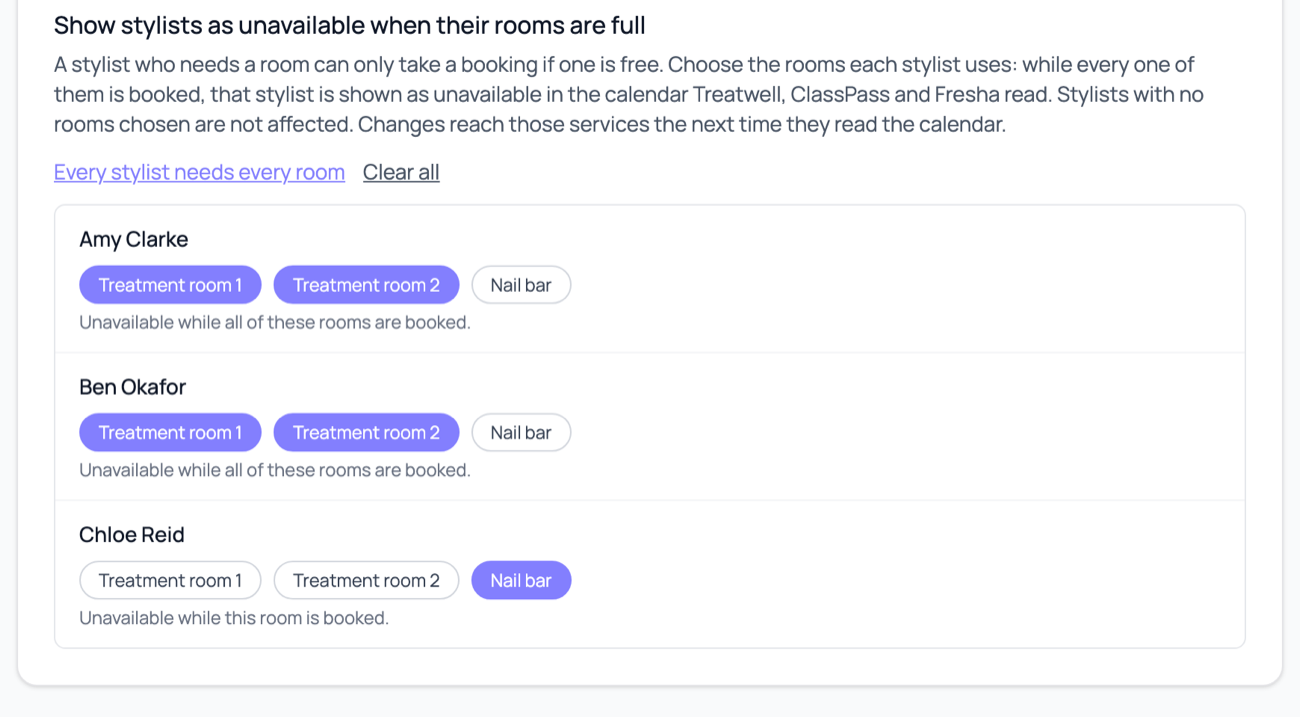
While every room chosen for a stylist is booked at the same time, that stylist is shown as unavailable in their calendar. You'll see it as NO ROOM AVAILABLE in the calendar Booking Connect shares with Treatwell, ClassPass and Fresha, for the next 30 days.
One room chosen: the stylist is unavailable whenever that room is booked.
Several rooms chosen: the stylist is unavailable only while all of them are booked at once. One free room is enough to keep them available.
No rooms chosen: nothing changes for that stylist.
Two shortcuts help: Every stylist needs every room and Clear all.
Only rooms you switched on at the top of Step 7 count. A room that is switched off is ignored, even if a stylist's choices still list it.
When it takes effect
Booking Connect works out the blocks from what is in Phorest. A new booking in a room shows up within a couple of minutes. Treatwell, ClassPass and Fresha then pick it up the next time they read the calendar, which can take a little longer. Cancelling a booking frees the room in the same way.
A stylist is unavailable when I didn't expect it
Open Step 7 and look at the day. Is every room that stylist uses booked at that time?
Check what is in the room. Anything in that room counts, including a break you added by hand with that room chosen.
Check the stylist's choices. Are they using more rooms than they need?
Use Clear all or remove the room from the stylist if the rule isn't right for them.
A stylist isn't blocked when I expected
Check that the rooms are switched on at the top of Step 7.
Check that the stylist has rooms chosen.
Check that the bookings are really in the room in Phorest. A booking with no room doesn't count.
Check that beta features are turned on, on your Team page.
If Booking Connect can't reach Phorest for a moment, the calendar is shared without room blocks rather than showing nobody as available. It catches up on the next read.
Booking Connect is an independent service. It isn't run by Treatwell, Phorest, Fresha or ClassPass.